Docs/Project Directory for Jira

Projects & risk
Project Directory for Jira
Every project you can see in one directory — table or cards, with search, filters, status, lead, and CSV export on Jira Cloud.
Get started
One directory for the projects on your site
I built Project Directory so you can browse every Jira project you are allowed to see from a single Forge page — instead of hunting through Jira’s own project list menus.
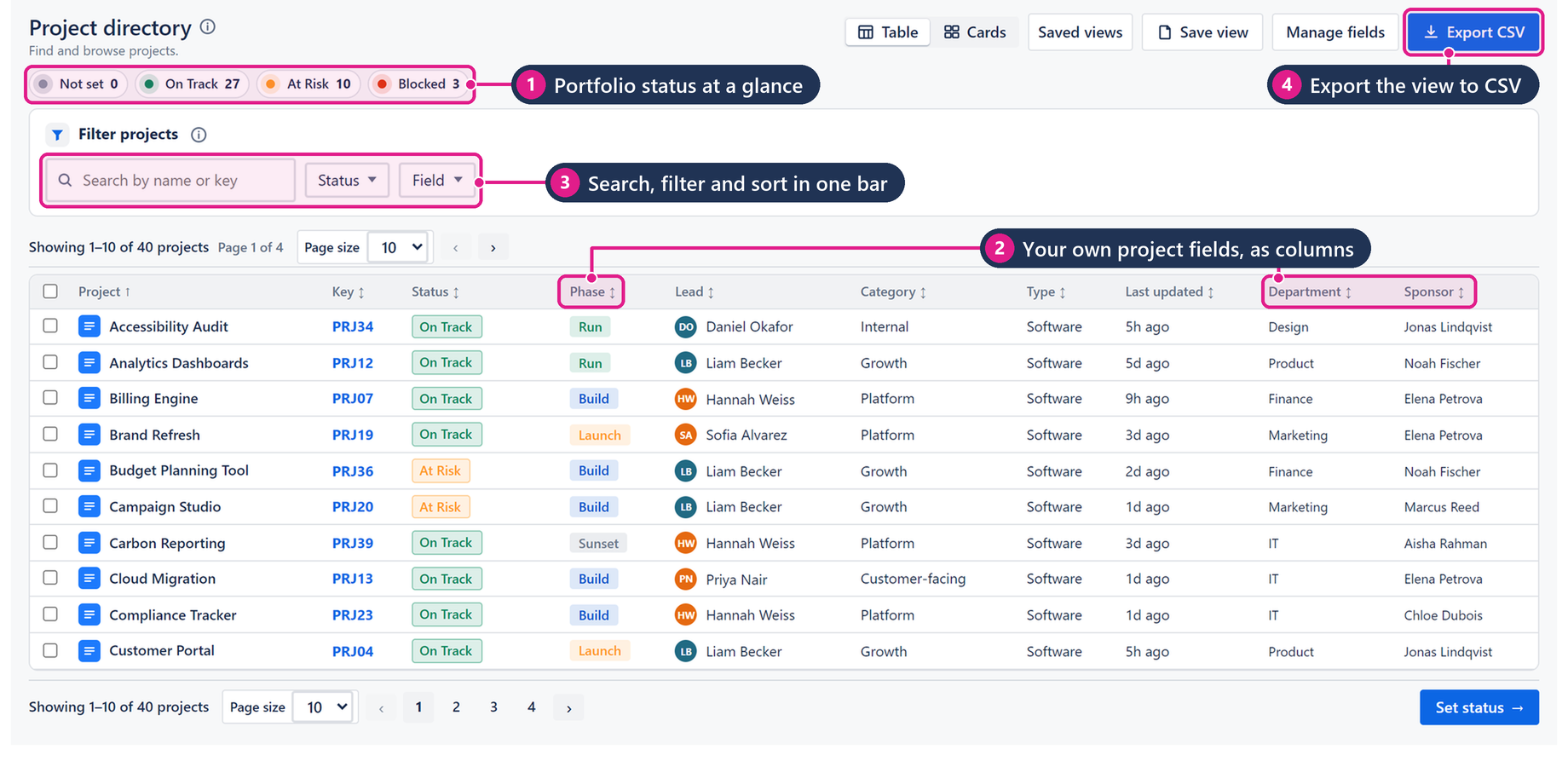
The directory shows key, name, status, lead, category, type, and last updated. Flip between Table and Cards. Search by name or key, add field filters when the list is long, save a view you reuse, and export CSV when you need a snapshot outside Jira.
There is no external server in the path. The app is Forge on Jira Cloud. Intended design is no egress: compute runs in Atlassian Forge, and customer data stays in your Jira site / Forge storage.
When teams open the directory
- Find a project fast — type a name or key and jump straight to it.
- Scan health at a glance — status values such as On Track, At Risk, Blocked, and Not set sit in the summary bar and as columns/cards.
- See who owns what — lead, category, and type in one place Jira’s stock project list does not give you together.
- Share a snapshot — export CSV or save a filtered view for recurring reviews.
Install from the Atlassian Marketplace
After Free ≤10 / the trial, paid is USD 0.45/user/mo via Atlassian — billed on the Marketplace like any other Cloud app.
- Open the Atlassian Marketplace listing for Project Directory for Jira (Jira Cloud): https://marketplace.atlassian.com/apps/876054797/try?hosting=cloud.
- Choose your site and install. A site admin must approve the scopes shown on the install screen.
- After install, open the app from Apps (or Settings → Apps → Project Directory, depending on your Jira navigation).
- Confirm the directory loads with the projects you are allowed to see.
Jira Cloud only. No Data Center / Server. The directory respects Jira project permissions — users only see projects they can already access.
Explore the docs
What it does and how to use each part
Configuration & adminAdmin setup, scopes and settings
Pricing & licensingFree tier, per-user pricing, trial
Privacy & securityData handling, policies, Runs on Atlassian
FAQ & troubleshootingCommon questions, smoke tests, support
Release notesWhat changed in each version